
MS Access As A Dev Tool
Access continues to be a highly efficient tool for business database development.
 Call (323) 285-0939
An aerospace supplier in Torrance called us with a database that had five people sharing one front-end file, no split, and a file size over 1 GB. Queries were locking up, reports took 8 minutes, and nobody had touched the compact settings in two years. We rebuilt it, moved the back-end to SQL Server, and had the weekly parts report running in under 45 seconds.
That kind of problem is fixable. Most of the time we can tell you what is wrong in the first session. Call (323) 285-0939 and tell us what your Torrance operation is dealing with.
Ready to get started? Call us or visit our contact page.
Alison Balter has been building and repairing Microsoft Access databases since Access version 2 in the early 1990s, long before most of her clients had heard of SQL Server. She holds MCSD, MCP, MCT, and Microsoft Certified Partner credentials, and has authored 15 books on Access programming, including the Mastering Microsoft Access series from Access 95 through Access 2007, a reference still used by development teams at large companies today.
That combination of hands-on experience and documented precision shows up in how we diagnose problems, not just in a credentials list. Before we write a line of code, we ask a lot of questions. Who enters data? Who pulls reports? What breaks most often? We gather that from the people who actually sit at the keyboard, not just the manager who requested the project. Then we design the structure, build the queries and forms, and deliver something your team can actually use on day one.
Torrance sits at the center of the South Bay with a dense concentration of aerospace suppliers, automotive companies, healthcare facilities, and professional services firms that all depend on reliable database systems. We have worked with businesses along Hawthorne Boulevard and in the Del Amo corridor for years. If your Access file is getting slow, your forms are misbehaving, or you need a more stable setup before bringing on more users, give us a call.

Ready to get started? Call us or visit our contact page.
An aerospace parts supplier in Torrance came to us with an Access inventory database that had grown to 1.1 GB and was locking up whenever more than three people tried to work in it at once. The original design had no front-end/back-end split, all five users were sharing one file, and none of the tables had primary keys. We restructured the database, split it properly, added indexes on the most-used filter fields, and moved the back-end to SQL Server. Query time on their weekly parts report dropped from 8 minutes to under 45 seconds.
That kind of result comes from knowing exactly what to look for and where the Access architecture breaks down under real-world load. We have been doing this for Torrance clients and across the South Bay for over 36 years. Whether your database needs a targeted fix or a full migration to SQL Server, we can tell you honestly which one makes sense before any work starts. Most of the businesses we work with in Torrance do not want to retrain their staff. They just want things to work.
Ready to get started? Call us or visit our contact page.

Ready to get started? Call us or visit our contact page.


Ready to get started? Call us or visit our contact page.





Access continues to be a highly efficient tool for business database development.
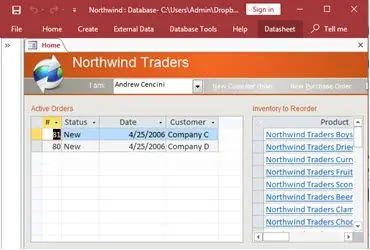
How to create a Microsoft Access application with some unique tips and tricks.
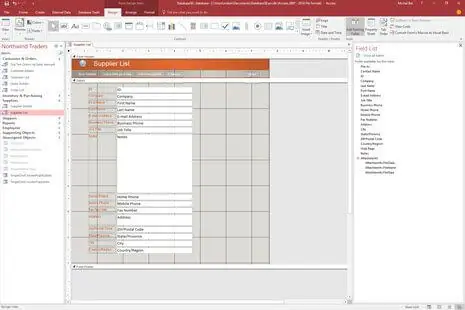
Your Access developer near me has some great info for you about using Access efficiently.
Answer: Usually yes. Error messages on open almost always point to file corruption, a broken table link, or a VBA compile error that got introduced after the last update. We make a copy first, then run compact and repair. If that clears it, we compact again to check stability. If it doesn't, we extract the tables and objects manually and rebuild the front end. Most Torrance clients are back up and running within a day.
Answer: A few things tend to show up together when the database is hitting its limits:
If one applies, we can usually fix it inside Access. If three or more apply at the same time, the conversation about SQL Server migration is worth having. We tell Torrance clients exactly what we see before recommending anything.
Answer: For most Torrance businesses managing inventory, client records, service history, or order tracking, Access is a solid move from Excel. The real question is whether the data volume and number of users fit what Access handles well. For one to ten users with a few hundred thousand records, Access with a proper SQL Server back-end is a practical, affordable choice. We can look at what you have in Excel and give you a direct answer on whether Access makes sense before any work starts.
Answer: We start by auditing the existing Access database: table structure, relationships, queries, and any VBA code that touches data directly. Then we move the tables to SQL Server, relink them from the Access front end, and test every form, report, and query. The most common issue we hit during testing is a date function or a nested query that Access handles differently than SQL Server does. Those take an extra day to sort out, sometimes two. Torrance clients typically see the migrated system running faster within the first day after that, and the Access forms their staff already knows stay exactly as they are.
Answer: Yes, and this is one of the more common requests we get from Torrance businesses. The technical import is straightforward. The work is in the data. Multiple spreadsheets mean inconsistent column names, date formats that don't match, customer names entered differently in each file, and duplicate rows across them all. We clean and normalize the data before it goes into Access, build the right table relationships, and set up validation rules so the merged database stays clean going forward. The result is one system instead of five files no one fully trusts.
Answer: A 45-minute Monday report is the most common starting point. We set it to run automatically at a scheduled time, format itself, and email out without anyone touching it. From there, VBA can handle validation on data entry, overnight cleanup routines that keep the database healthy, and threshold alerts when a number hits a level someone needs to know about. Most Torrance clients who go through this see the time come back within the first couple of weeks.
Answer: Almost everything we do is handled remotely. We connect to the database through a secure session, make the changes, and walk you through what was done. For most repairs and performance fixes, remote is faster than scheduling an on-site visit. If the situation calls for being there in person, we can do that for Torrance clients. But in our experience, most database problems are easier to work on when we can access the files directly from our end without someone watching over a shared screen waiting for it to load.
Ready to get started? Call us or visit our contact page.
Torrance is home to a wide range of businesses that depend on structured data: aerospace and defense suppliers, automotive parts distributors, healthcare clinics, and professional services firms running everything from billing to inventory in Access databases. When those databases slow down, grow too large for a single-file setup, or start generating errors, we are the team that gets called. We have been working with South Bay clients for over 36 years.
The most common issue we see in Torrance is an Access database that was set up years ago for a smaller team and has never been properly split or optimized as the business grew. File sizes are often well above what Access handles cleanly, multiple users share a single front-end file, and nobody has run a compact in months. Performance suffers, locking errors appear, and eventually something corrupts. These are all problems with known fixes.
When you need a Microsoft Access programmer for your Torrance, California business, call MS Access Solutions at (323) 285-0939. We handle quick VBA fixes, full custom database builds, SQL Server migrations, and everything in between. Our clients in Torrance span aerospace, healthcare, automotive distribution, and retail. Some call with a single broken form. Others need a full migration to SQL Server. We handle both.
We serve all cities in Los Angeles County, including Redondo Beach, California.
MS Access Solutions provides Microsoft Access programming, repair, and SQL Server migration services throughout Los Angeles County.