
MS Access As A Dev Tool
Access continues to be a highly efficient tool for business database development.
 Call (323) 285-0939
San Dimas businesses run on data, and when that data is stuck in a slow or broken Access database, the whole operation feels it. We've been building and repairing Microsoft Access databases for over 36 years. Custom builds, corrupted file recovery, VBA automation, SQL Server migration when a single shared file stops keeping up — that's most of what comes through the door.
Maybe the file stopped opening this morning. Maybe it's still opening but queries that used to finish in seconds are dragging, or two people can't work in it at the same time without stepping on each other. Whatever the situation, we don't need a long ramp-up to figure it out. Call (323) 285-0939 and give us a quick description of what's happening.
Ready to get started? Call us or visit our contact page.
Alison Balter has been building and repairing Microsoft Access databases since Access version 2 in the early 1990s, long before most of her clients had heard of SQL Server. She holds MCSD, MCP, MCT, and Microsoft Certified Partner credentials, and has authored 15 books on Access programming, including the Mastering Microsoft Access series from Access 95 through Access 2007, a reference still used by development teams at large companies today.
That combination of hands-on experience and documented precision shows up in how we diagnose problems, not just in a credentials list. Before we write a line of code, we ask a lot of questions. Who enters data? Who pulls reports? What breaks most often? We gather that from the people who actually sit at the keyboard, not just the manager who requested the project. Then we design the structure, build the queries and forms, and deliver something your team can actually use on day one.
A lot of what we see in San Dimas comes from the Arrow Highway corridor. Distributors and light manufacturers who built their tracking in Access years ago and kept adding tables to it until the thing started slowing down. The Via Verde corridor has a different mix, more retail and professional services, but the database problems tend to rhyme. File too big, reports not matching, one person in the system at a time. We've worked in this part of the county long enough that those calls feel familiar.

Ready to get started? Call us or visit our contact page.
A San Dimas wholesale distributor came to us with an Access database managing roughly 8,000 SKUs across multiple product lines. As their catalog grew, multi-user locking conflicts started happening daily and the morning inventory report took over two minutes to generate. We moved the data tables to SQL Server, rebuilt the linked tables with proper indexing, and reconfigured the query structure. That same report now runs in about eight seconds, and the locking conflicts are gone.
When field staff also need to log orders or check inventory from a browser or tablet, ASP.NET connects the SQL Server back-end to a web interface without replacing the Access front-end the office team already knows. Most San Dimas businesses we work with want things to work better, not require their staff to learn something new from scratch.
Ready to get started? Call us or visit our contact page.

Ready to get started? Call us or visit our contact page.


Ready to get started? Call us or visit our contact page.





Access continues to be a highly efficient tool for business database development.
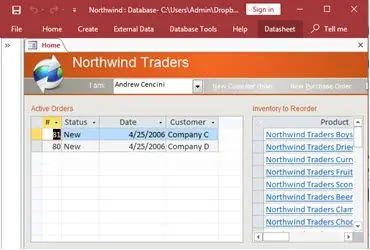
How to create a Microsoft Access application with some unique tips and tricks.
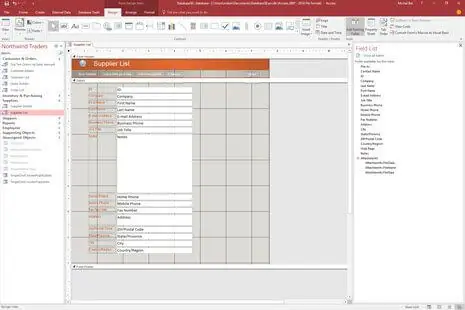
Your Access developer near me has some great info for you about using Access efficiently.
Answer: Sudden failure to open is almost always corruption. It can be triggered by a network dropout while the file was being written, a power interruption, or a forced shutdown while Access had a lock on the file. We start with a full copy so nothing gets lost, then run compact and repair. If that doesn't open it, we extract the tables and objects manually. San Dimas businesses in most cases are back running within a day or two.
Answer: Some signs it's time:
If one or two apply, targeted Access fixes may be enough. If three or more apply, migration is the right call. We tell San Dimas clients honestly which path makes sense before any work starts.
Answer: We start by mapping what the business needs to track, who enters data, and what reports matter most. Then we build the table structure, relationships, input forms, and queries around that. Most custom builds for San Dimas clients take four to eight weeks, though that range can stretch if requirements shift partway through or there's messy legacy data to sort out first. Most clients are using the system within the first day. There's usually a handful of tweaks after people start using it for real, which is normal.
Answer: Dropped ODBC links usually mean the connection string is storing a cached server path that no longer resolves, or the SQL Server credentials have expired. We refresh the linked table manager, update the connection strings to use a DSN-less format, and configure the tables to reconnect automatically on startup. For San Dimas businesses running high-volume order entry, we also check whether the connection pool settings on SQL Server need adjustment to handle peak load cleanly.
Answer: Yes, though the setup depends on what you're trying to automate. VBA can run reports on a schedule, export them to PDF or Excel, and email them without anyone touching the database. We use Windows Task Scheduler to trigger the macro at a set time each day. Some businesses find it saves 30 to 45 minutes of manual work. Others are surprised it frees up more time than that, because the reports were actually being pulled multiple times a day by different people. Worth mapping out what's actually happening before assuming.
Answer: Wrong report numbers usually trace back to one of three places: a query with an incorrect join that is doubling or dropping rows, a calculation field referencing the wrong column, or data entry errors that have built up over time. We audit the query logic, compare report totals against raw table counts, and trace the discrepancy to its source. Most of the time we can isolate the problem in a single session. Occasionally the query logic is tangled enough that we need a second look, especially if the same report has been modified multiple times by different people.
Answer: Duplicates usually come from missing unique constraints at the table level, a form that allows re-entry of existing records, or an import process that does not check for existing matches before adding rows. We add unique indexes on the key fields, update the form logic to detect existing records before saving, and clean up the duplicates already in the data. The prevention part is straightforward. Cleaning up what's already there is sometimes messier than clients expect, especially if the duplicates have been accumulating for a few years and some of them have child records attached. San Dimas businesses with high-volume data entry are better off getting this sorted sooner rather than later.
Ready to get started? Call us or visit our contact page.
A lot of San Dimas businesses are still running Access databases that were set up five or ten years ago. Most of them work fine until they don't. When something breaks, or the file gets too large, or a second person needs to log in at the same time, that's usually when we get the call. We fix whatever went wrong, and if the setup needs a proper SQL Server back-end to stay stable, we handle that too.
San Dimas businesses range from light manufacturers and wholesale distributors along Arrow Highway to retail operations, professional services, and companies connected to the Bonelli Regional Park recreation economy. Many of the databases we see here started as simple tracking files and slowly grew into something much larger than they were built to handle. Performance degrades, forms start behaving oddly, and sometimes files get corrupted. Those are all fixable problems we deal with regularly.
When you need a Microsoft Access programmer for your San Dimas, California business, call MS Access Solutions at (323) 285-0939. We have been doing this work for over 36 years. Our clients include wholesale distributors, healthcare offices, logistics companies, and government agencies, among others. Some call with a quick VBA fix and it's done in an afternoon. Others hand us a database that hasn't been compacted in three years, has duplicate records in six tables, and was last touched by someone who no longer works there. Those take longer. Either way we give clients a straight read on scope before touching anything.
We serve all cities in Los Angeles County, including La Verne, California.
MS Access Solutions provides Microsoft Access programming, repair, and SQL Server migration services throughout Los Angeles County, including San Dimas and surrounding cities.