
MS Access As A Dev Tool
Access continues to be a highly efficient tool for business database development.
 Call (323) 285-0939
South Pasadena has a strong professional community: legal offices, financial services firms, healthcare practices, and education-related businesses along Mission Street and Fair Oaks Avenue. A lot of those operations use Microsoft Access to manage client records, billing, and scheduling. When those systems start causing problems, we're the team that fixes them.
We've been building and repairing Access databases for over 36 years. We diagnose performance problems, recover corrupted files, write VBA automation that eliminates manual work, and migrate data to SQL Server when a business has grown beyond what Access alone can handle. Call (323) 285-0939 to talk through what your South Pasadena operation needs.
Ready to get started? Call us or visit our contact page.
Alison Balter has been building and repairing Microsoft Access databases since Access version 2 in the early 1990s, long before most of her clients had heard of SQL Server. She holds MCSD, MCP, MCT, and Microsoft Certified Partner credentials, and has authored 15 books on Access programming, including the Mastering Microsoft Access series from Access 95 through Access 2007, a reference still used by development teams at large companies today.
That combination of hands-on experience and documented precision shows up in how we diagnose problems, not just in a credentials list. Before we write a line of code, we ask a lot of questions. Who enters data? Who pulls reports? What breaks most often? We gather that from the people who actually sit at the keyboard, not just the manager who requested the project. Then we design the structure, build the queries and forms, and deliver something your team can actually use on day one.
South Pasadena is a small, close-knit city between Pasadena and Los Angeles with a notable concentration of professional services, educational support businesses, healthcare offices, and local retailers. We have worked with businesses along Mission Street and in the surrounding neighborhoods. If your Access file is getting slow, your reports are misbehaving, or you just need a cleaner setup before bringing on more users, give us a call.

Ready to get started? Call us or visit our contact page.
A South Pasadena professional services firm came to us with an Access database tracking client engagements and billing that had been running for about eight years. The file had grown past 900 MB and generating a quarterly billing summary was taking close to five minutes. We moved the data to SQL Server, rebuilt the linked tables, and indexed the client ID and date fields properly. That same report now pulls in under fifteen seconds.
When staff also need browser access to client information without opening Access, ASP.NET connects the SQL Server back-end to a clean web interface. The office team keeps using Access exactly as before. Most businesses we work with in South Pasadena don't want to change how their staff works. They just want reliable tools that don't slow them down.
Ready to get started? Call us or visit our contact page.
Ready to get started? Call us or visit our contact page.


Ready to get started? Call us or visit our contact page.





Access continues to be a highly efficient tool for business database development.
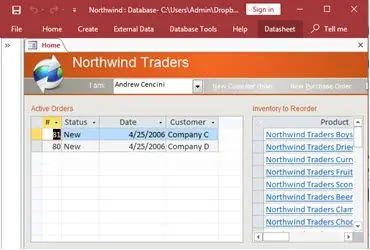
How to create a Microsoft Access application with some unique tips and tricks.
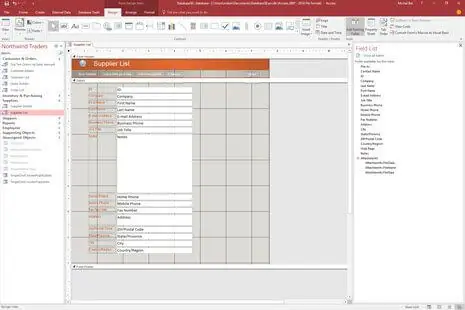
Your Access developer near me has some great info for you about using Access efficiently.
Answer: Yes. Recovery depends on how deep the corruption goes. We always work on a copy so the original isn't touched. Most cases respond to compact and repair. When they don't, we extract tables and objects individually and reconstruct the working database. We've recovered files clients were told were unrecoverable. For South Pasadena businesses managing active client records, getting back up quickly matters. That's how we approach every recovery job.
Answer: Slow reports almost always come from the query behind them. The query is either pulling the entire table before filtering, joining across fields with no indexes, or opening more records than it needs to. We review the query design, add indexes where they're missing, and rewrite the retrieval logic when needed. A report that takes five minutes can often be brought down to under thirty seconds without changing what it actually shows.
Answer: Split database deployment is the standard approach. The data tables live in a back-end file on a shared drive. Each person runs their own copy of the front-end forms from their own machine. Set up this way, three or four staff can work simultaneously without overwriting each other. We also configure record locking so two people editing the same record at the same time don't create a conflict. Many South Pasadena practices come to us after setting this up incorrectly on their own.
Answer: For many internal tools, yes. When the database is designed properly and split correctly, Access handles billing tracking, client scheduling, and case management reliably without drama. It struggles when too many people share one file on a network drive, or when data volume has outgrown what the original design anticipated. Those are fixable problems, not reasons to throw out a working system.
Answer: Yes. This is one of the most common things we do. If your team spends time every week pulling data, formatting it, and emailing it to the same people, VBA can handle all of that on a schedule. We build the automation around your actual workflow: run Monday morning, pull the right records, format the output, send it to the right list. Most projects like this pay for themselves within a month.
Answer: Yes, and this is a project we take on regularly. The work is mostly about data quality, not the import itself. Spreadsheets accumulate inconsistent formatting, duplicate entries, and mixed data types over years of use. We clean the data before it comes into Access, build the proper table structure, and add validation rules so future entries stay clean. A number of South Pasadena firms have used this to eliminate a manual process that was taking hours every week.
Answer: A repair is right when the structure is sound but something specific broke: a form, a query, a VBA routine. A rebuild makes sense when the original design has fundamental problems: no relationships between tables, everything in one flat table, or a structure that can't support the queries the business actually needs. We do a short audit first and give you a straight answer on which one applies before any work starts.
Ready to get started? Call us or visit our contact page.
Call MS Access Solutions at (323) 285-0939 for your FREE Consultation.
South Pasadena's business community is concentrated along Mission Street and Fair Oaks Avenue. You'll find legal offices, financial advisors, healthcare practices, tutoring centers, and specialty retail. Many of those businesses use Access to manage client records, billing, scheduling, or inventory. Those databases tend to be quiet until something goes wrong, and when they do it usually affects daily operations immediately. We work with South Pasadena businesses regularly and understand the kinds of problems that come up.
The most common work here is performance repairs on databases that haven't been maintained in years, VBA automation for billing and reporting workflows that staff currently run manually, and multi-user setup corrections for offices where two or three people share a single Access file incorrectly. We also rebuild Access systems that were originally set up without proper table structure and have accumulated data problems as the record count grows.
When your South Pasadena, California business needs a Microsoft Access programmer, call MS Access Solutions at (323) 285-0939. We've been doing this work for over 36 years. Our clients include legal offices, financial services firms, healthcare practices, educational organizations, and local government agencies. Some need a targeted repair. Others bring us a system that's been patched together for years without proper maintenance. Both are work we take on regularly.
Get more information about our programming services on the Pasadena, California web page.
MS Access Solutions provides Microsoft Access programming, repair, and SQL Server migration services throughout Los Angeles County.