
MS Access As A Dev Tool
Access continues to be a highly efficient tool for business database development.
 Call (323) 285-0939
Most Redondo Beach clients find us after a database stops opening on a Monday morning, or a report that ran fine for two years starts coming back wrong. We have fixed files that topped 900 MB with no compaction in over a year, rebuilt split architectures that were never set up properly, and written VBA that replaced an hour of manual work every single day.
If the file won't open, the queries are timing out, or you're not sure what broke, call (323) 285-0939. We'll tell you what we see before any work starts.
Ready to get started? Call us or visit our contact page.
Alison Balter has been building and repairing Microsoft Access databases since Access version 2 in the early 1990s, long before most of her clients had heard of SQL Server. She holds MCSD, MCP, MCT, and Microsoft Certified Partner credentials, and has authored 15 books on Access programming, including the Mastering Microsoft Access series from Access 95 through Access 2007, a reference still used by development teams at large companies today.
That combination of hands-on experience and documented precision shows up in how we diagnose problems, not just in a credentials list. Before we write a line of code, we ask a lot of questions. Who enters data? Who pulls reports? What breaks most often? We gather that from the people who actually sit at the keyboard, not just the manager who requested the project. Then we design the structure, build the queries and forms, and deliver something your team can actually use on day one.
Redondo Beach sits in the South Bay with a concentrated mix of marine technology firms, healthcare offices, professional services companies, and retail businesses that all depend on clean data to operate. We have worked with businesses along Artesia Boulevard and throughout the beach corridor for years. If your Access file is slowing down, your reports are off, or you need a cleaner setup before adding more users, give us a call.

Ready to get started? Call us or visit our contact page.
A marine equipment distributor in Redondo Beach came to us with an Access inventory database that was returning wrong stock counts on purchase orders. The file had grown to 920 MB, queries were pulling from linked Excel sheets with no validation, and two critical tables had no primary keys. We restructured the data model, added proper indexes, cleaned out 3 years of orphaned records, and brought the file down to 210 MB. Purchase orders started generating correctly the next morning.
That kind of work takes more than knowing how Access works. It takes knowing what bad data looks like and where to find it. We have been doing this for Redondo Beach clients and across the South Bay for over 36 years. Whether your database needs a repair or a complete rebuild, we can tell you honestly which one makes sense before any work starts. Most of the businesses we work with in Redondo Beach do not want to retrain their staff. They just want things to work.
Ready to get started? Call us or visit our contact page.

Ready to get started? Call us or visit our contact page.


Ready to get started? Call us or visit our contact page.





Access continues to be a highly efficient tool for business database development.
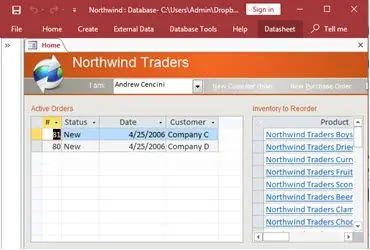
How to create a Microsoft Access application with some unique tips and tricks.
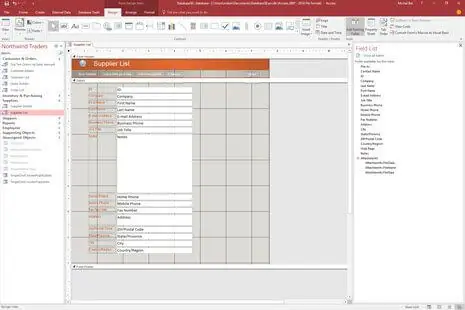
Your Access developer near me has some great info for you about using Access efficiently.
Answer: Most sudden open failures come down to file corruption, a broken front-end link, or a Windows permission change that blocked access to the shared drive. The first thing we do is make a copy of the file before touching anything. Then we run compact and repair. If that doesn't resolve it, we extract the tables and objects manually. Most Redondo Beach clients are back up within a day. We have recovered files people were ready to write off entirely.
Answer: A few signals tell us migration is the right conversation:
If one of those applies, we can usually fix the situation inside Access. If three or more apply together, SQL Server is worth the conversation. We tell Redondo Beach clients honestly which path makes sense before any work starts.
Answer: We start by asking a lot of questions. Who enters data? Who pulls reports? What are the three things that break most often in your current process? Once we have that from the people who actually do the work, we design the table structure, build the relationships, and create the forms and queries around real workflows. Most custom builds for Redondo Beach businesses take four to eight weeks. Clients are using it within the first day and the early questions that come in week one get handled as part of the project.
Answer: Slow reports almost always trace back to one of three things: the file has not been compacted in months and is carrying a lot of bloat, the queries feeding the report are doing full-table scans on large datasets without indexes, or someone added new records and the data volume crossed a threshold the original design was not built for. We run a performance audit, review the query plans, check index coverage, and look at file health. Most of the time we can identify the problem in a few hours and the fix is faster than clients expect.
Answer: Yes, and this is something we do often. The import itself is rarely the hard part. The challenge is the data quality that builds up in spreadsheets over time: inconsistent date formats, customer names entered six different ways, blank rows mixed in with real records. We clean the data first, structure it properly in Access, and set up validation rules so the same problems don't come back with the next import. Several Redondo Beach businesses have used this to retire a copy-paste process they had been running for years.
Answer: We built a VBA routine for a Redondo Beach services firm that used to spend 90 minutes each Monday pulling and formatting a weekly summary report. It now runs in under 2 minutes with one button click. Beyond scheduled reports, VBA handles data validation on entry, end-of-day cleanup routines, and follow-up actions triggered by what someone types into a form. Most clients are surprised how much of their manual process disappears once it's automated.
Answer: The standard approach is a split database setup. The back end holds all the data on a shared network drive, and each user runs their own front-end copy on their own machine. That eliminates most locking conflicts immediately. We also set record locking so two people cannot edit the same row at the same time. One thing worth knowing: if you are already above five or six simultaneous users, or the file is pushing past 1 GB, a split setup buys time but SQL Server is probably the right longer-term move. We'll tell you which situation you're in before we configure anything.
Ready to get started? Call us or visit our contact page.
Redondo Beach has a business community that runs on tight margins and reliable data. Marine technology companies, healthcare offices along Aviation Boulevard, logistics firms near the port corridor, and professional services businesses all use databases to manage day-to-day operations. When those databases are slow, corrupted, or just not doing what they should, we get the call. Most of the time we can diagnose the problem remotely and have clients back up the same day.
The most common situation we run into is a database that was built as a simple tracking file five or eight years ago and slowly took on more responsibility than it was ever designed for. Forms start behaving strangely, queries time out, and the file size creeps toward 1 GB. Sometimes the file corrupts after a network hiccup and nobody has a clean backup. Those are all fixable problems, and we handle them regularly for South Bay clients.
When you need a Microsoft Access programmer for your Redondo Beach, California business, call MS Access Solutions at (323) 285-0939. We have been doing this work for over 36 years. Our clients include marine technology firms, healthcare offices, distributors, and professional services companies throughout the South Bay. Some call with a quick VBA fix. Others hand us a file that has not been compacted in years and needs a full rebuild. We handle both.
We serve all cities in Los Angeles County, including Torrance, California.
MS Access Solutions provides Microsoft Access programming, repair, and SQL Server migration services throughout Los Angeles County.