
MS Access As A Dev Tool
Access continues to be a highly efficient tool for business database development.
 Call (323) 285-0939
San Gabriel has a lot of businesses that run on spreadsheets when they really need a database. We've converted hundreds of Excel files into proper Access systems for clients who outgrew rows and columns, and we build new Access applications from scratch when the business needs something structured from day one.
Our work covers custom database builds, file repairs, VBA automation, and SQL Server migrations. Some clients call us because something broke. Others call because they want to get ahead of the problem before it gets expensive. Either way, we can help. Call (323) 285-0939 to talk through your San Gabriel project.
Ready to get started? Call us or visit our contact page.
Alison Balter has been building and repairing Microsoft Access databases since Access version 2 in the early 1990s, long before most of her clients had heard of SQL Server. She holds MCSD, MCP, MCT, and Microsoft Certified Partner credentials, and has authored 15 books on Access programming, including the Mastering Microsoft Access series from Access 95 through Access 2007, a reference still used by development teams at large companies today.
That combination of hands-on experience and documented precision shows up in how we diagnose problems, not just in a credentials list. Before we write a line of code, we ask a lot of questions. Who enters data? Who pulls reports? What breaks most often? We gather that from the people who actually sit at the keyboard, not just the manager who requested the project. Then we design the structure, build the queries and forms, and deliver something your team can actually use on day one.
San Gabriel sits in the western San Gabriel Valley, home to a dense mix of restaurants, healthcare practices, professional services firms, and light industrial businesses. We have worked with businesses on Las Tunas Drive and throughout the surrounding corridors for years. If your Access file is getting slow, your reports are misbehaving, or you just need a cleaner setup before adding more users, give us a call.

Ready to get started? Call us or visit our contact page.
A San Gabriel medical office came to us with an Access database tracking patient records and billing that had been running for about eleven years. By the time they called, generating the monthly billing summary took over three minutes. We moved the tables to SQL Server, rebuilt the linked tables, and added indexes on the patient ID and date fields. That same report now runs in twelve seconds.
When front desk staff also need browser access to appointment and billing data without opening Access, ASP.NET connects the SQL Server back-end to a clean web interface. The clinical team keeps using Access forms exactly as before. Most businesses we work with in San Gabriel don't want to retrain their staff. They just want things to work reliably.
When field staff also need to log data from tablets or a browser, ASP.NET connects the SQL Server back-end to a fast web interface without replacing the Access front-end the office team already knows. Most of the businesses we work with in San Gabriel do not want to retrain their staff. They just want things to work.
Ready to get started? Call us or visit our contact page.

Ready to get started? Call us or visit our contact page.


Ready to get started? Call us or visit our contact page.





Access continues to be a highly efficient tool for business database development.
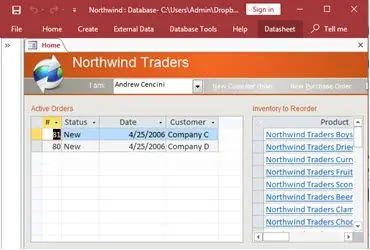
How to create a Microsoft Access application with some unique tips and tricks.
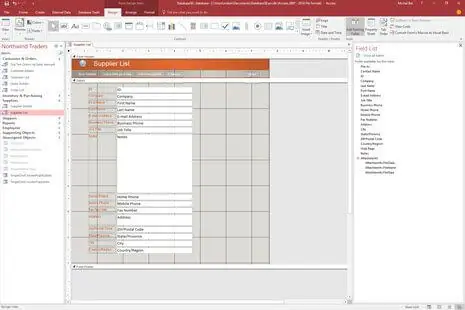
Your Access developer near me has some great info for you about using Access efficiently.
Answer: It depends on the damage. Most corruption cases where the file throws errors on open or forms stop responding, we can assess within a few hours. We copy the file first, then work on the copy. Compact and repair handles a lot of cases. When it doesn't, we extract the tables and objects manually. Most San Gabriel clients are back up within a day or two. We've recovered files people had given up on entirely.
Answer: Frequent crashes usually point to one of three things: the database hasn't been compacted in a long time and the file is bloated, multiple users are sharing a single front-end file instead of running their own copy, or there's a VBA error that isn't being handled cleanly. We run a diagnostic, check the file health, and look at how it's deployed. Usually the fix is faster than people expect.
Answer: Yes, and we do this often. The challenge is almost never the import itself; it's the data quality. Years of spreadsheet use leaves inconsistent formatting, duplicate rows, and mixed data types in the same column. We clean the data first, structure it properly in Access, and set up validation rules so future entries don't recreate the same mess. Several San Gabriel businesses have used this to retire a copy-paste workflow they'd been running for years.
Answer: Yes. We've built Access systems for healthcare offices, restaurant groups, distributors, professional services firms, and light manufacturers in the San Gabriel area. The industry shapes the data model: what tables you need, how records relate, what reports matter most. We start by asking a lot of questions about your actual workflow before writing any code.
Answer: A fix is right when the structure is sound but something specific broke: a form stopped working, a query returns wrong results, or a VBA routine throws errors. A rebuild makes more sense when the original design has fundamental problems. Here are the signs we look for:
We'll tell you honestly which situation you're in before any work starts.
Answer: Almost all of our work is done remotely. We access the database through a secure connection, make the changes, and walk you through what was done. For San Gabriel clients, an on-site visit is possible when the situation calls for it, but in most cases remote is faster and just as effective. You don't need to take a day out of the office for a database repair.
Answer: The signals are clear when migration is the right call: the file is regularly exceeding 1 GB, five or more people need simultaneous access, or key reports that used to run fast now time out. If one of those applies, we can often tune the Access setup to buy more time. If two or three apply together, migrating the data to SQL Server while keeping Access as the front-end is the smarter long-term investment. We tell you honestly which path makes more sense before anything starts.
Ready to get started? Call us or visit our contact page.
Call MS Access Solutions at (323) 285-0939 for your FREE Consultation.
The San Gabriel business community runs on data: restaurant inventory and food distribution records along Valley Boulevard, patient scheduling in healthcare practices, and job tracking in professional services firms. A lot of those operations rely on Access databases that have been running for years without much attention. We work with businesses in this corridor regularly. When something breaks or starts slowing down, we're the team they call.
The most common jobs we take on here are corruption repairs, performance tuning on bloated files, VBA automation for repetitive workflows, and Excel-to-Access migrations for businesses that have outgrown spreadsheets. We also rebuild databases that were set up without proper table structure: no relationships, no primary keys, everything in one table. Those cause problems as the data volume grows.
When your San Gabriel, California business needs a Microsoft Access programmer, call MS Access Solutions at (323) 285-0939. We've been doing this work for over 36 years. Clients include restaurant groups, food distributors, healthcare practices, professional services firms, and local government offices. Some need a quick form fix. Others bring us a file that hasn't been touched properly in a decade. Both are projects we take on regularly.
We serve all cities in Los Angeles County, including San Marino, California.
MS Access Solutions provides Microsoft Access programming, repair, and SQL Server migration services throughout Los Angeles County.