
MS Access As A Dev Tool
Access continues to be a highly efficient tool for business database development.
 Call (323) 285-0939
Lawndale businesses that rely on Microsoft Access databases need a programmer who has done this kind of work for decades, not someone learning on your file. We build custom databases from the ground up, clean up systems that have grown messy over the years, write VBA automation that actually runs reliably, and connect Access to SQL Server when your data volume demands it.
Most database problems are fixable. Whether your Access file started crashing, your queries take too long, or you need to build something new from a stack of spreadsheets, we know what to do. Call (323) 285-0939 and tell us what your Lawndale business is dealing with.
Ready to get started? Call us or visit our contact page.
Alison Balter has been building and repairing Microsoft Access databases since Access version 2 in the early 1990s, long before most of her clients had heard of SQL Server. She holds MCSD, MCP, MCT, and Microsoft Certified Partner credentials, and has authored 15 books on Access programming, including the Mastering Microsoft Access series from Access 95 through Access 2007, a reference still used by development teams at large companies today.
When Alison looks at an unfamiliar database, the first thing she does is ask the people who actually use it daily, not the manager who submitted the request. Who enters data? Who pulls reports? What breaks most often, and when did it start? That information shapes the table structure, the queries, and the forms far more than any assumptions we could bring in from the outside. Then we build it, and what gets delivered is something your staff can actually sit down and use on day one.
Lawndale sits in the South Bay, surrounded by Hawthorne, Gardena, Torrance, and Inglewood. The business mix here runs from auto-related shops and small manufacturers to healthcare offices and services companies. Many of them run operations on Access databases that were set up years ago. If your file is getting slow, forms are misbehaving, or you need a cleaner multi-user setup before adding staff, give us a call.

Ready to get started? Call us or visit our contact page.
A Lawndale auto parts distributor called us about an Access file that had been in use for about seven years. What started as a simple parts inventory tracker had grown to include purchase orders, vendor contacts, and customer billing. Queries that used to run fast were taking two to three minutes. We moved the data tables to SQL Server, re-linked everything from the Access front-end, and rebuilt the indexes on the key lookup fields. The daily inventory report that took over three minutes now finishes in about twelve seconds.
When technicians also need to check parts availability from a tablet in the shop, ASP.NET connects that same SQL Server data to a fast browser interface, without replacing the Access front-end the office staff already knows. Most Lawndale businesses we work with have no interest in retraining their staff. They want what they already have to work faster and more reliably.
Ready to get started? Call us or visit our contact page.

Ready to get started? Call us or visit our contact page.


Ready to get started? Call us or visit our contact page.





Access continues to be a highly efficient tool for business database development.
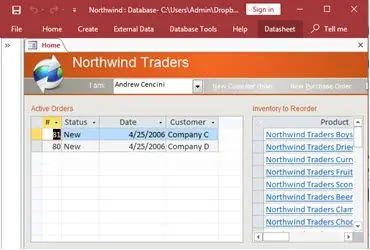
How to create a Microsoft Access application with some unique tips and tricks.
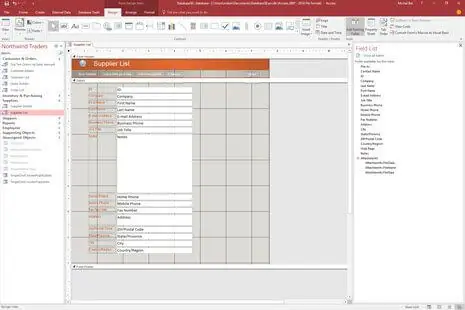
Your Access developer near me has some great info for you about using Access efficiently.
Answer: Yes. We copy the file first, then run compact and repair. If that does not clear it, we extract tables and objects manually. Most Lawndale businesses are back up the same day or next. We have recovered files clients were certain were gone for good.
Answer: A few signals worth watching for:
If one or two apply, targeted fixes inside Access often buy several more years. If three or more apply, migration is probably the better investment. We give you a straight answer on which path makes more sense before anything gets billed.
Answer: Before we write a line of code, we have usually already asked ten or fifteen questions about how the business actually runs day to day. Things like: who enters data and from where, what reports management pulls every week, and what in the current setup breaks most often. That last one is especially useful because it tells us where the previous design cut corners. The table structure and relationships have to match how the business actually operates, not how someone hoped it would work when they built the original file.
Once the design is set, we build the input forms, queries, and reports, then test everything against your real data before handing anything over. For most Lawndale businesses a complete custom build runs four to eight weeks. We stay available for the first few weeks after go-live because edge cases always come up, and catching them early is a lot easier than fixing them after staff has been working around them for a month.
Answer: Missing indexes on filtered fields, queries that pull far more data than needed, or a file that has not been compacted in months. Those three things account for most of it. A quick audit usually pinpoints the main cause within a couple of hours.
Answer: Quite a bit, once you start listing the manual steps your staff does every day. VBA can generate and email reports on a schedule, run data cleanup routines at the end of each shift, flag entries that look wrong before they save, and trigger follow-up actions automatically based on what someone enters. One client was spending about ninety minutes each morning pulling and formatting a summary report by hand. After we automated it, the report was waiting in their inbox before they arrived.
Answer: Data quality is almost always the hard part of an Excel-to-Access migration. Spreadsheets pick up inconsistent formatting, mixed data types in a single column, and duplicate rows over years of use. We audit the source data before any import happens, fix what needs fixing, then set up the import process with validation rules that catch the same problems on future imports. Several Lawndale businesses we work with had been copy-pasting from Excel into Access by hand for years. After the migration, that step disappears entirely.
Answer: Access itself is not designed for remote use over a VPN without some extra planning, and if you try to run the back-end file that way you will usually see corruption or locking errors within a few weeks. The fix we use for most Lawndale businesses with remote staff is moving the back-end data tables to SQL Server or Azure SQL. Those platforms handle remote connections cleanly. The Access front-end your office staff already knows stays exactly the same, so there is nothing new to learn on their end. We have set this up for a few South Bay businesses where one or two people work from home part of the week. It is not a complicated migration if the database is reasonably well-structured, and most of the time we can do it without any downtime during business hours.
Ready to get started? Call us or visit our contact page.
Lawndale sits just west of Gardena and south of Hawthorne in the South Bay. It is a compact city with a working mix of businesses: auto service shops, light manufacturing, healthcare clinics, and small distributors. Many of them run their operations on Microsoft Access databases that were built years ago and have been running on quiet autopilot ever since. Those systems tend to work fine until something changes, a staff member leaves, a second person needs to log in at the same time, or the file just gets too large. That is usually when we hear from them.
Businesses in the South Bay, including Lawndale, Hawthorne, Inglewood, Gardena, and Torrance, tend to want the straightforward answer first. If the database can be fixed and kept running, that is what we recommend. If it has grown past what Access can carry reliably, we say that too, and we walk through what moving to SQL Server would actually cost and take. It is usually a shorter conversation than people expect.
When you need a Microsoft Access programmer for your Lawndale, California business, call MS Access Solutions at (323) 285-0939. We have been doing this work for over 36 years. Our clients include auto distributors, healthcare offices, light manufacturers, and service companies across the South Bay. Some call with a single VBA question. Others send us a file that has not been maintained in years and ask us to assess it and fix what needs fixing. We handle both.
We serve all cities in Los Angeles County, including Hawthorne, California.
MS Access Solutions provides Microsoft Access programming, repair, and SQL Server migration services throughout Los Angeles County.