
MS Access As A Dev Tool
Access continues to be a highly efficient tool for business database development.
 Call (323) 285-0939
Pasadena runs on knowledge work: Caltech and JPL pull in researchers, the healthcare corridor around Huntington Hospital pulls in clinical staff, and both groups end up with complicated databases. When an Access file starts misbehaving, whether it's corruption, slow queries, or multi-user conflicts, the operational impact is immediate. We've been solving these problems for over 36 years.
We work with Pasadena clients on everything from quick corruption repairs to full SQL Server migrations where the Access front-end stays in place. Your staff doesn't have to learn a new system. Call (323) 285-0939 and tell us what's going on. We'll figure out the right fix together.
Ready to get started? Call us or visit our contact page.
Alison Balter has been building and repairing Microsoft Access databases since Access version 2 in the early 1990s, long before most of her clients had heard of SQL Server. She holds MCSD, MCP, MCT, and Microsoft Certified Partner credentials, and has authored 15 books on Access programming, including the Mastering Microsoft Access series from Access 95 through Access 2007, a reference still used by development teams at large companies today.
That combination of hands-on experience and documented precision shows up in how we diagnose problems, not just in a credentials list. Before we write a line of code, we talk to the people who actually sit at the keyboard, not just whoever commissioned the project. We want to know what breaks most often under pressure, because that's usually where the real design problem is hiding. Then we build the structure, queries, and forms around what we find, and deliver something the team can use from day one.
Pasadena's economy runs on knowledge work. Research labs and scientific institutions along Foothill Boulevard, healthcare systems and specialty medical practices, nonprofit foundations, educational organizations, and a growing technology sector all generate and depend on structured data. We've worked with businesses and organizations in this corridor for years. If your Access file is getting slow, your reports are misbehaving, or you need a cleaner setup before expanding your team, call us.

Ready to get started? Call us or visit our contact page.
A Pasadena healthcare management company came to us with a database that had been tracking patient referrals, billing codes, and provider schedules for about eight years. It started as a straightforward referral log and ended up holding data for over 12,000 records. By the time they called, query times had climbed past three minutes and two staff members had resorted to their own spreadsheets just to get through the day. We indexed the primary lookup fields, rewrote two key queries, and moved the data tables to SQL Server. Those same queries now run in under four seconds.
When Pasadena teams also need staff to access data from home or a remote office, ASP.NET connects the SQL Server back-end to a clean web interface without replacing the Access front-end the in-office team already knows. Most of our Pasadena clients aren't looking for a new system. They just want the one they have to work reliably.
Ready to get started? Call us or visit our contact page.

Ready to get started? Call us or visit our contact page.


Ready to get started? Call us or visit our contact page.





Access continues to be a highly efficient tool for business database development.
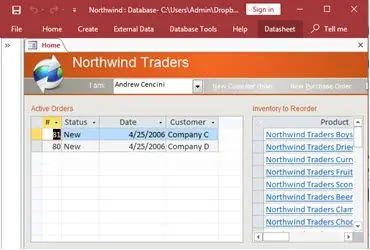
How to create a Microsoft Access application with some unique tips and tricks.
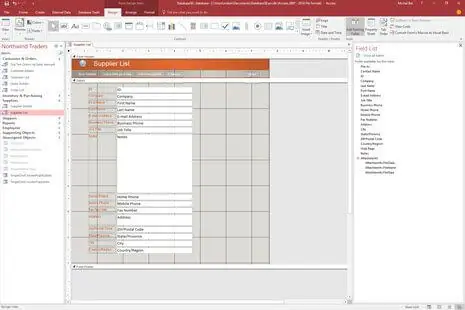
Your Access developer near me has some great info for you about using Access efficiently.
Answer: Corruption typically surfaces as errors on open, records that won't commit, or forms that suddenly stop loading. We make a full copy before touching anything, run compact and repair, and if that doesn't resolve it, we extract tables and objects manually. Most Pasadena businesses are back up within a day or two, depending on how extensive the damage is.
Answer: Usually a combination of these shows up at once:
If only one or two of those apply, targeted fixes in Access may be all you need. Three or more, and migration is usually worth doing. We'll tell you honestly which makes sense for your situation before any work starts.
Answer: Pasadena builds tend to have more stakeholders than most. One group enters grant data, another pulls compliance reports, and a third needs dashboards for a funder. We start by mapping those workflows before touching a single table. Then we build the structure and relationships around what we find, add forms, queries, and reporting, and deliver it. Most projects run four to eight weeks. The first week of real use usually surfaces a few adjustments, and we handle those as part of the build.
Answer: Slow queries in Pasadena databases almost always trace back to three places: missing indexes on the fields people filter most, queries pulling far more data than the report needs, or a file that hasn't been compacted and is carrying deleted-record overhead. We run a performance audit, check query execution plans, look at index coverage, and review file health. In most cases we pinpoint the main problem within a few hours. The fix is often quicker than clients expect.
Answer: Worth doing properly, especially for Pasadena organizations in healthcare and research, since not everyone should be able to see or change every record. We build role-based permissions that control which users can view, add, edit, or delete data in specific areas of the database. With SQL Server as the back-end, you also get Windows-level authentication, which ties access to the credentials staff already use to log into their computers.
Answer: The key is splitting the database correctly. The back-end holds all the data and lives on a shared network location. Each user runs their own copy of the front-end on their own computer. That setup lets people work simultaneously without stepping on each other's records. We also configure record-level locking so two people can't edit the same row at the same time, which is a common source of conflicts when the split hasn't been done right.
Answer: Moving from 32-bit to 64-bit Office is one of the most common reasons we hear from Pasadena clients. Some ActiveX controls, certain ODBC drivers, and older VBA code written for 32-bit won't run in 64-bit without changes. We audit the affected components, update the code that needs it, replace controls that have no 64-bit equivalent, and test the database across the Office versions your team is running. The goal is consistent behavior on every machine.
Ready to get started? Call us or visit our contact page.
A lot of Pasadena organizations are running Access databases that were built a decade ago and have gradually become load-bearing infrastructure. When something breaks, or the file grows past what it was built to handle, or a new department needs access at the same time, that's when we get the call. We fix what went wrong and, if the underlying setup needs SQL Server to stay stable going forward, we take care of that too.
Pasadena has one of the more distinctive mixes of industries in the San Gabriel Valley. Research and engineering institutions near the Caltech and JPL corridor, healthcare systems and specialty practices along Colorado Boulevard, nonprofits managing grant and membership data, and a technology sector that has been growing steadily in the old Playhouse District. The databases we work on here tend to be more complex than average because the organizations themselves track more kinds of data, often across departments with different access needs. The most common problems are the same ones we see everywhere: a database that grew past its original design, performance issues that crept in slowly, or a migration that never happened but probably should have.
When you need a Microsoft Access programmer for your Pasadena, California organization, call MS Access Solutions at (323) 285-0939. We've been doing this work for over 36 years. A lot of our Pasadena calls come from organizations that inherited a database from a grant-funded project and now need it to keep running without the person who built it. Some call with a specific VBA bug. Others send us a database that's been growing unchecked for years and needs a real plan. We handle both.
We serve all cities in Los Angeles County, including Arcadia, California.
MS Access Solutions provides Microsoft Access programming, repair, and SQL Server migration services throughout Los Angeles County.