
MS Access As A Dev Tool
Access continues to be a highly efficient tool for business database development.
 Call (323) 285-0939
 When a Microsoft Access database starts slowing down, people stop trusting the numbers. Reports run long, forms time out, and "quick" Excel exports become the daily routine. We help Lancaster organizations repair broken queries and reports, stabilize multi-user behavior, and tune VBA so your database runs cleanly again. If the file is pushing past what a single Access back end can handle, we upsize tables to SQL Server and keep Access as the familiar front end. Call us now at (323) 285-0939.
In Lancaster, Access databases often start as a simple tracker for jobs, inventory, inspections, or client records. Then the file becomes the system everybody relies on, and the weak spots show up at the worst time: a report that takes forever, a form that suddenly won't save, or a shared file that freezes when two people work at once.
MS Access Solutions helps Lancaster organizations repair and modernize Microsoft Access systems without forcing a full rewrite. We can fix design and query problems, tighten up VBA, and make reports reliable again. If the database is growing past what a single .accdb should hold, we can upsize tables to SQL Server while keeping Access as the front end your staff already knows.
Not sure what's really wrong? We start with a practical review and show you what we see: query bottlenecks, missing indexes, bloated tables, shaky imports, or code that's doing too much. You get clear priorities, realistic options, and a plan that fits real budgets and real deadlines.
The owner, consultant, and principal programmer at MS Access Solutions is Alison Balter – a recognized expert Microsoft Access consultant. Alison is the author of 15 Microsoft Access training books and videos. She is a frequent guest speaker at MS Access conferences and has developed hundreds of applications for businesses of all types.
We know your business data is important. We listen to your concerns, ask clarifying questions, and gather input from the people who use the system every day. Together we define what you need from your database, why certain features matter, and how staff actually works. From there we design the right table structure, queries, forms, dashboards, and reports so you get a stable system that supports real-world decision making.










Access continues to be a highly efficient tool for business database development.
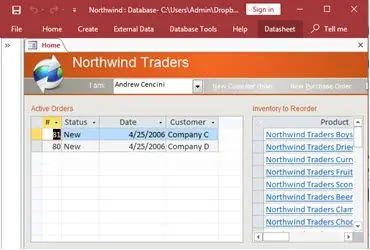
How to create a Microsoft Access application with some useful tips and best practices.
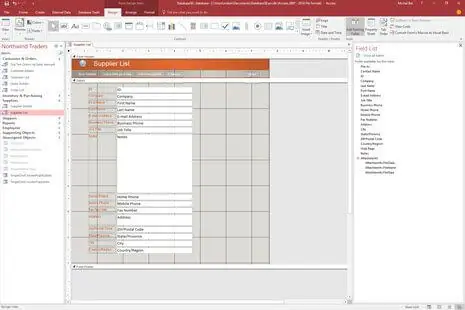
Your Access developer near you has practical advice on choosing and working with an Access consultant.
Call MS Access Solutions at (323) 285-0939 for your FREE consultation.
Most Access databases slow down in small steps. Forms start taking longer to open, reports stall, and users begin to wait before clicking the next button. The usual causes are missing indexes, queries that pull more rows than the form needs, and tables that have grown without periodic cleanup. We identify the specific bottlenecks, then tighten indexes, simplify query logic, and adjust how forms load data so performance feels steady again.
When multiple people are working in the same file, record locking and design choices matter. If users see save errors, freezes, or sudden message prompts, the front end may be shared, the form may be bound to too many fields, or the database may be locking more data than necessary. We separate front ends correctly, tune form record sources, and set locking behavior so users can work at the same time without stepping on each other.
Exporting data to Excel can feel like a harmless shortcut until it becomes part of the daily routine. What usually starts as just one report slowly turns into a habit because reports take too long to run, totals do not look right, or someone is worried a query might freeze the database. At that point, the database stops being trusted, even though it is still where the data lives.
We hear this often from business owners and managers in Lancaster and throughout the Antelope Valley who now have multiple spreadsheets circulating, each one slightly different. One person updates numbers before a meeting, another saves a local copy to finish work later, and before long no one is sure which version is correct. That uncertainty creates tension, especially when deadlines are tight or decisions depend on accurate totals.
The bigger risk is that Excel workarounds hide real problems inside the database. Missing indexes, inefficient queries, or poorly designed reports do not fix themselves. As more people rely on exports, the Access file continues to degrade quietly in the background. When someone finally needs a clean report quickly, the database cannot deliver.
We step in by identifying why exports became necessary in the first place. That usually means rebuilding reports so they run quickly, correcting query logic that produces inconsistent totals, and tightening table relationships so the data behaves predictably. Once the database becomes reliable again, the need for daily exports fades away. The goal is not to eliminate Excel entirely, but to make sure your Access database is once again the place people trust for answers.
Older VBA code can run for years, then fail after an Office upgrade, a Windows update, or a small field name change. We review the code paths that matter most, remove brittle assumptions, and replace risky shortcuts with clearer logic. The result is fewer surprises and a system that is easier to support as your environment changes.
If you are seeing frequent corruption warnings, slow backups, or hesitation before opening large tables, your data may be pushing past what a single Access file handles well. In many cases, the best move is to keep Access as the familiar front end and move the tables to SQL Server. That improves reliability, supports better backups, and gives you room to grow without forcing a full retraining of staff.
Answer: Yes. Older Access files are common in Lancaster because a “temporary” database often becomes mission critical. We review tables, relationships, queries, forms, and VBA to see what is solid and what is risky. Then we make repairs in a controlled way with backups and a simple rollback plan.
Answer: Most slowdowns come from missing indexes, heavy queries, and forms or reports that pull far more data than they need. The same design that felt fine at 10,000 rows can struggle at 500,000. We trace the bottlenecks, tune queries, and adjust how screens load so performance stays predictable.
Answer: Yes. If multiple people share an Access database, poor front-end distribution and table design can cause conflicts. We separate front end and back end correctly, reduce contention hot spots, and tighten queries so users are not fighting over the same records. The goal is fewer freezes, fewer “could not update” messages, and smoother daily work.
Answer: Often, yes. People export when filtering is awkward, reports are fragile, or the database feels slow and unreliable. We can improve the Access workflow so users can get answers without extra spreadsheets. If Excel is still needed for a specific handoff, we can automate a clean export so it is consistent and less error prone.
Answer: It makes sense when you need stronger reliability, better security control, and more room to grow. Many Lancaster projects keep Access as the familiar front end while SQL Server stores the tables. That approach improves performance, backups, and multi-user stability without forcing everyone to learn a new interface.
Answer: Yes. Modernization can be phased. We can start by fixing the most painful issues, then improve forms and reports, and then refactor VBA where it is fragile or hard to maintain. You get measurable improvement without an all-at-once rewrite.
Answer: Start with a review. We look for corruption risk, broken references, query bottlenecks, and design issues that cause recurring errors. You get a plain-English summary of what we found, what to fix first, and what can wait. From there, you can choose a small repair or a staged improvement plan.
Get more information about our programming services on the Microsoft Access programmer Lawndale, California web page.