
MS Access As A Dev Tool
Access continues to be a highly efficient tool for business database development.
 Call (323) 285-0939
Santa Monica businesses move fast, and a database that slows things down is a real problem. We build custom Microsoft Access applications, repair corrupted files, write VBA code that handles repetitive tasks automatically, and connect Access to SQL Server when a single-file setup stops keeping up.
Whether your Access file throws errors on Monday morning or your queries run so slow your staff just gave up using them, we sort it out. Media companies, nonprofits, law firms, and tech startups along the Westside have called us over the years with exactly these kinds of problems. Call (323) 285-0939 and tell us what your Santa Monica operation is dealing with.
Ready to get started? Call us or visit our contact page.
Alison Balter has been building and repairing Microsoft Access databases since Access version 2 in the early 1990s, long before most of her clients had heard of SQL Server. She holds MCSD, MCP, MCT, and Microsoft Certified Partner credentials, and has authored 15 books on Access programming, including the Mastering Microsoft Access series from Access 95 through Access 2007, a reference still used by development teams at large companies today.
That combination of hands-on experience and documented precision shows up in how we diagnose problems, not just in a credentials list. Before we write a line of code, we ask a lot of questions. Who enters data? Who pulls reports? What breaks most often? We gather that from the people who actually sit at the keyboard, not just the manager who requested the project. Then we design the structure, build the queries and forms, and deliver something your team can actually use on day one.
Santa Monica has one of the more varied business communities on the Westside, mixing entertainment companies, tech startups, legal firms, healthcare practices, and retail headquarters along the Third Street Promenade corridor. We have worked with organizations in this area that range from small creative agencies to multi-location professional services firms. Database problems look different depending on the industry, and we adjust accordingly.

Ready to get started? Call us or visit our contact page.
A Santa Monica entertainment law firm called us with an Access database they had been patching together for about seven years. It tracked contracts, royalties, client contacts, and billing, all in a single Access file sitting on an office server. By the time we saw it, reports that used to run overnight were now timing out entirely. We rebuilt the linked table structure, moved the data to SQL Server, and re-indexed the fields that queries hit most often. That overnight report now finishes in under four minutes.
When staff also need to pull contract records from home or a client site, ASP.NET puts a clean web interface in front of the SQL Server data without touching the Access setup the office team knows. Most Santa Monica businesses we work with want the same thing: fewer headaches, not a whole new system to learn.
Ready to get started? Call us or visit our contact page.

Ready to get started? Call us or visit our contact page.


Ready to get started? Call us or visit our contact page.





Access continues to be a highly efficient tool for business database development.
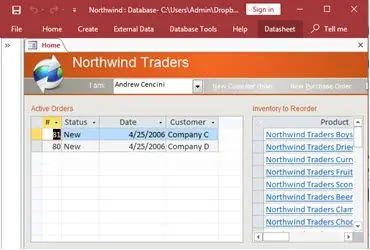
How to create a Microsoft Access application with some unique tips and tricks.
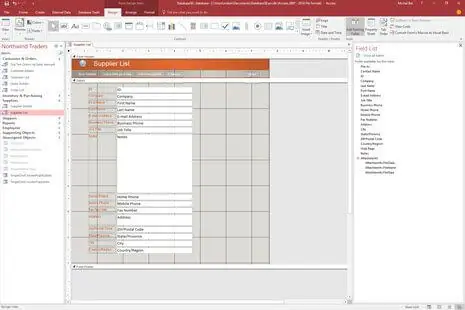
Your Access developer near me has some great info for you about using Access efficiently.
Answer: Random crashes in Access usually point to one of a few things. File corruption is the most common, especially in databases that multiple people open at the same time from a shared drive. A bloated file that has not been compacted in months can also cause instability. We make a safe copy first, then run diagnostics to figure out exactly what is triggering the problem. Most Santa Monica clients have their database stable again within a day or two of contacting us.
Answer: A few clear signs worth watching for:
If one or two of those apply, targeted fixes inside Access may be all you need. Three or more is usually a clear signal that migration makes sense. We tell Santa Monica clients honestly which direction fits before any work starts.
Answer: Yes, and we do it regularly. We start by mapping what your business needs to track, who enters the data, and what reports you actually use. Then we design the table structure, relationships, input forms, and queries around those specifics. Most custom builds take four to eight weeks depending on complexity. The goal is a system your staff can use on day one without a training manual.
Answer: It can, and Excel-to-Access migrations are one of the more common jobs we handle. The challenge is almost never the import itself; it is the data quality. Spreadsheets that have been around for a few years tend to have inconsistent formatting, mixed data types, and duplicate entries. We clean the data before it comes in, set up the import process, and build validation rules so future entries stay clean. A lot of Santa Monica businesses use this to finally retire a copy-paste process nobody wanted to keep doing.
Answer: More than most people realize. VBA can generate and email reports on a schedule, run end-of-day cleanup routines, validate data before it commits, and trigger follow-up actions based on what someone enters in a form. One Santa Monica client was spending about 90 minutes a day manually compiling a status report. After we wrote a simple VBA routine, it runs in about three minutes and sends itself. Most automation projects pay for themselves within a few months.
Answer: It depends on what broke. A file that will not open due to standard corruption often gets resolved the same day. A database with deeper structural problems, broken relationships, or missing table objects can take two to three days. We always back up the file before touching anything, and we keep you posted as we work through it. Most Santa Monica clients are back up and running faster than they expected.
Answer: They can, but the setup matters. The correct approach is to split the database into a back-end file (data only) on a shared drive and a separate front-end file for each user on their own computer. Done properly, multiple people can enter and retrieve records simultaneously without overwriting each other. We also configure record locking to prevent two people from editing the same row at once. If your current setup is causing conflicts, it almost certainly has not been split correctly, and that is a straightforward fix.
Ready to get started? Call us or visit our contact page.
Santa Monica is one of the more active business cities on the Westside of Los Angeles. The mix here is genuinely varied, running from production companies and talent agencies near Wilshire to professional services firms, healthcare practices, and tech companies closer to the airport corridor. What they share is that many of them run databases that were set up five or ten years ago and have quietly grown into something more complicated than anyone planned for.
The most common situation we run into is an Access database that started as a simple tracking file and slowly absorbed more functions over time. Someone added a module. Someone else linked in a spreadsheet. Eventually the file is doing things it was never designed to do, and performance has dropped accordingly. We see this a lot in the entertainment, legal, and nonprofit sectors that are well represented in Santa Monica. Queries time out. Reports fail. Staff stop trusting the numbers.
When you need a Microsoft Access programmer for your Santa Monica, California business, the fix usually starts with understanding what the database is actually being asked to do versus what it was built to handle. Sometimes that means tuning indexes and rewriting slow queries. Sometimes it means splitting a monolithic Access file into a proper front-end and back-end setup. And sometimes it means migrating the data to SQL Server so the Access front-end can keep working without the performance drag. We have done all three for Santa Monica clients across different industries.
We serve all cities in the Westside and Los Angeles County area, including Culver City, California.
MS Access Solutions provides Microsoft Access programming, repair, and SQL Server migration services throughout Los Angeles County.