





MS Access As A Dev Tool
Access continues to be a highly efficient tool for business database development.
Some Glendale companies are still leaning on a file built years ago because it runs the day-to-day work. Quotes, inventory, service history, month-end numbers. Then one vendor spreadsheet changes, one report starts coming out wrong, and people begin keeping side notes just to get through the week.
That is usually when we get the call. We sort out what is actually broken, what just grew messy, and what can wait a little longer. Some jobs need code cleanup and report fixes. Some need the heavier data moved off the old setup. The point is simple: make the file stop slowing everybody down. Call (323) 285-0939 for Glendale database help.
We usually get brought in after a file has started wearing people out. In Glendale, that can be a parts import that double-posts, a customer screen staff no longer trusts, or a month-end report that changes because one filter got bumped.
We fix inherited files, clean up old VBA, straighten out imports, rebuild rough screens, and move the heavy tables when one old setup is carrying too much.
We work with purchasing desks, service staff, office managers, accounting support, shipping, and the people stuck holding together the internal jobs nobody notices until the file goes sideways.
Usually we start with the thing people complain about first. The form that sticks. The report nobody believes. The import that dumps junk into the wrong table. Get that under control, then line up the deeper cleanup.
We work remotely. The first conversation is usually pretty direct: what changed, who is blocked, and what part of the day is now taking twice as long.
Call: (323) 285-0939
Service Area: Glendale, Peoria, Phoenix, Surprise, Sun City, And The West Valley
Owner And Access Expert: Alison Balter
Microsoft Certified Solutions Developer (MCSD)
Microsoft Certified Professional (MCP)
Microsoft Certified Trainer (MCT)
Microsoft Certified Partner (MCPa)
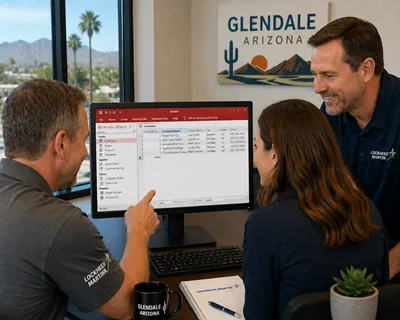
Alison Balter of MS Access Solutions developed a custom Microsoft Access and SQL Server application that Lockheed Martin uses company-wide, including at its Glendale, Arizona location. The build was not a simple form-and-table project. It involved designing a normalized table structure to hold data across multiple business functions, writing complex queries to pull and summarize that data accurately, and building a dashboard that gives staff a clear operational view without digging through raw records. That dashboard part mattered — engineers needed to see what was happening without opening five different screens. Forms were designed around the way Lockheed Martin engineers actually work, not around a generic layout. Reports deliver consistent output for both local and remote users. VBA handles the logic running behind each screen, macros cover the automated steps that need to fire without user input, and SQL Server sits underneath all of it to handle the volume and concurrent access a company-wide deployment requires.
MS Access Solutions signed a Non-Disclosure Agreement with Lockheed Martin, so what the database tracks and manages cannot be discussed here. What can be said: Alison Balter has 36 years working with Microsoft Access, 15 published books through Sams Publishing, and holds MCSD, MCP, MCT, and MCPa certifications. That is the background Lockheed Martin relied on. When you need a Microsoft Access programmer for your Glendale business, call us at (323) 285-0939 so we can start helping you right away.
Many Glendale companies still use Access to hold together purchasing, inventory movement, customer history, or service scheduling while extra spreadsheets pile up around the edges. Then month-end depends on three exports, two manual checks, and one person who remembers the weird step.
It usually starts small. One screen hangs. A lookup shows duplicates. A report takes forever. Someone keeps a side workbook because the numbers feel off. Nothing about it sounds dramatic. It still burns time every week.
Alison Balter has spent decades sorting through systems like that. Some need a rebuild. Plenty do not. Clean up the VBA. Fix the joins. Split the file correctly. Tighten permissions. Move the heavier data off the old setup when that makes sense. Not glamorous work. Very practical work.
Credentials:
Microsoft Certified Solutions Developer (MCSD) - Microsoft recognition for application development work.
Microsoft Certified Professional (MCP) - formal Microsoft technical certification.
Microsoft Certified Trainer (MCT) - recognized for teaching Microsoft technologies.
Microsoft Certified Partner (MCPa) - part of the Microsoft partner program.
You can also review our Arizona page for broader statewide coverage.

We work with businesses across Arizona on Microsoft Access database programming, repair, automation, and migration. These city pages cover the kinds of Access problems we help solve across the state.

Phoenix is where we see more large files, harder repair work, and reporting routines that have been accumulating problems for years.
Learn More
Tucson tends to involve databases that have outgrown their original design and need someone to clean up the structure before the next failure.
Learn More
Mesa often comes down to day-to-day database fixes, small recurring repair gaps, and cleanup that should have happened years ago.
Learn More
Gilbert is usually more about repair work, report fixes, and the kind of cleanup that keeps a shared file from getting worse over time.
Learn More
Chandler is a good fit when the main need is untangling older routines and getting a database easier to maintain and rely on again.
Learn More
Scottsdale tends to involve older files that need more than a quick patch, especially when the workflow has grown unreliable over time.
Learn More
Peoria is where the conversation often shifts to broken tables, macros, reports, and routines people still work around by hand.
Learn More
Tempe focuses on targeted repairs, steadier reports, and practical fixes when users have stopped trusting what the file is doing.
Learn More
With Surprise, the issue is often an inherited database that needs sensible updates instead of another layer of workarounds.
Learn More
Goodyear is a better match when the file needs straightforward repairs, better flow, and cleanup that actually sticks.
Learn More
Yuma businesses often need practical fixes and solid database foundations that hold up in a demanding, high-use environment.
Learn More
Avondale is a good fit when the database needs to be more reliable day to day and the current setup has too many moving parts held together manually.
Learn More
San Tan Valley often means a database built for a smaller operation that has since been patched by several people over the years.
Learn More
Buckeye is a good fit for new database builds and practical repairs when a growing business has outgrown its current setup.
Learn More
Flagstaff businesses can count on the same remote Access support, repair, and upgrade work we provide across Arizona.
Learn More





Access continues to be a highly efficient tool for business database development.

How to create a Microsoft Access application with some unique tips and tricks.

Your Access developer near me has some great info for you about using Access efficiently.
Answer: Yes, if it is set up correctly. The mistake we see most is everybody opening the same working file from the network. Give each person a local front end and keep the shared data where it belongs. That alone fixes a surprising amount of friction.
Answer: When the file is slowing people down every day and repairs are not fixing it anymore, that is usually the right time to talk about moving the data behind it.
Answer: Most of the time, that is query logic. Totals get calculated after filters, joins duplicate rows, or the export trims values in ways nobody notices at first. When someone says the report changed, we trace the math before we blame the data.
Answer: Yes, and we prefer a staging step. The raw file lands in a holding table first. Then we check column types, catch duplicates, and only append clean rows to the live data. That way you can see what got rejected and why when a vendor quietly changes the layout.
Answer: Do not start by touching everything. The risk with older VBA files is that a change in one place breaks something three screens away that nobody connects back to the edit. We work through it in a specific order:
The payroll-day rule applies here: you do not want the first live test to happen when the stakes are highest. We stage the rollout so the people using the file every day are the last to feel any disruption, not the first.
Answer: All the time. Sometimes the answer is just an index. Other times the split was done badly years ago, the linked-table paths are messy, or one form is loading far more data than anybody needs. Slow screens and locking issues almost always have a reason.
Answer: It can. We still see it handling purchasing, inventory, quoting, service history, and internal tracking every week. Usually the trouble is not the platform by itself. It is the years of add-ons, side files, and rushed changes stacked on top of each other.
Answer: That is one of the most common situations we walk into. We read through the tables, queries, forms, and code ourselves before we touch anything, so we are working from what the file actually does now rather than what someone remembers it doing.
We hear some version of the same call all over the West Valley. A file that was fine for a few people picks up more history, more exports, and more quick patches. Then an Office update, a path change, or a revised vendor spreadsheet hits it and every weak spot shows up at once. Nobody says, "We have technical debt." They say, "Why did this thing break on a Tuesday?"
That is when the workaround becomes the process. Not a great sign.
In Glendale, the first things to wobble are usually ordinary business tasks: intake, scheduling, purchasing, reconciliations, inventory movement, and recurring reports people need before lunch. It is routine work. It still has to be right.
A full rebuild is not always the first smart move. Plenty of Glendale files get noticeably better once the obvious pressure points are handled in the right order. Some of the best fixes are pretty boring.
Need help with your Access database? Call the Microsoft Access experts at MS Access Solutions at (323) 285-0939.